THE NOTETAKER WAY · AFTER
- 1A bot records the call from the sidelines.
- 2A summary lands in your inbox later.
- 3Someone turns it into the actual document.
- 4You book another meeting to finish deciding.
LivingMeeting settles it before the call ends. Owners named, work started, next meeting booked. Livi keeps the agenda honest and sketches the plans you talk through. All you do is show up and talk.
The meeting room itself. No bot joining your Zoom.
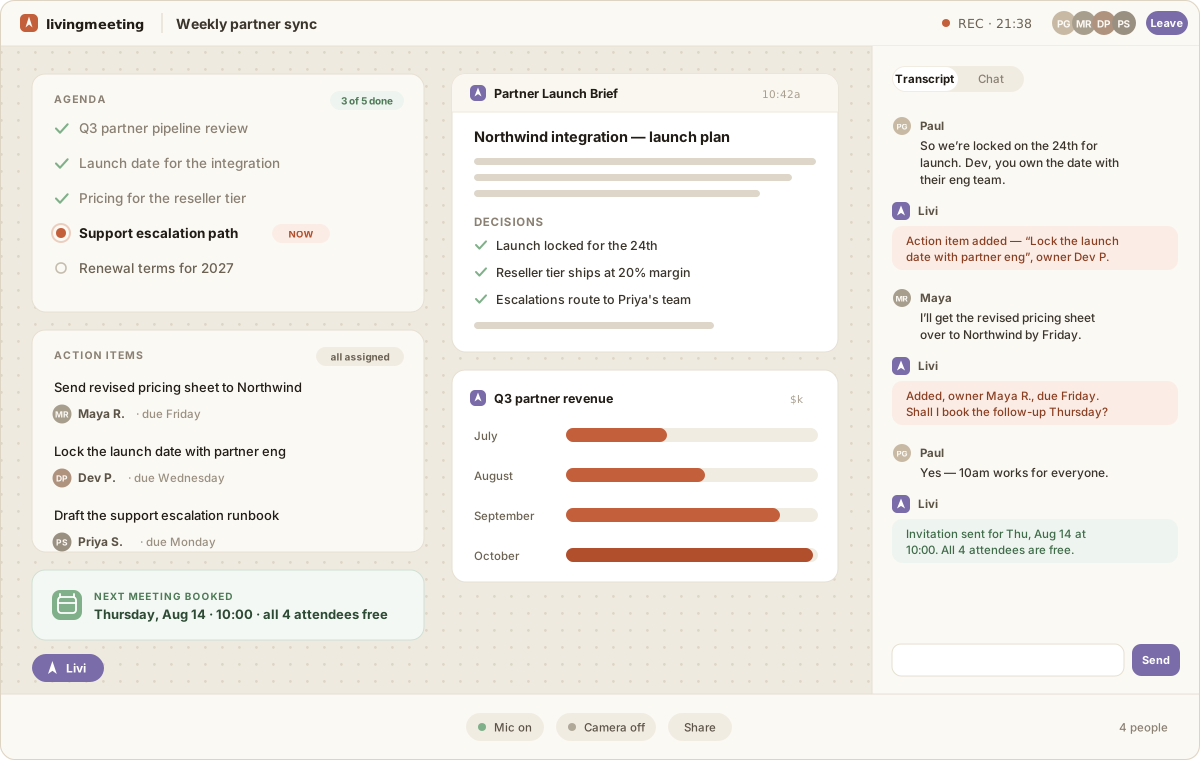
Agenda checked off as you go, every action item with a named owner, the brief and the board built on the canvas while you talked. Thursday is already on everyone's calendar.
Decisions scatter into memories, DMs, and half-finished notes. Owners stay fuzzy. Next steps slip a week. By the next meeting, half of it needs deciding again.
Every notetaker writes a tidier summary of what was said. LivingMeeting closes the gap between what was said and what happens next while everyone is still in the room.
Each one closes a gap you have felt in ordinary meetings.
Topics are captured, organized, and checked off as you go, so the room always knows what is done and what is still open.
Action items are captured with a name attached, in front of everyone. There is no recap to interpret and no mystery about who owns what.
Ask for the chart, document, spreadsheet, or flowchart you need. Livi builds it while you talk, and everyone can edit it together.
Livi checks connected calendars, suggests times that fit the conversation, gathers live availability, and sends the invite from the room.
Next week opens with the previous decisions, open action items, and shared work already on the table. Your team starts with context instead of rebuilding it.
Sync meetings, check availability, and send real calendar invitations.
Connect Outlook calendars and working hours, and import your meetings.
Ask Livi to schedule a call, choose a mutual time inline, and keep the channel current.
Ask about decisions, action items, and what your team agreed to, right where you already work.
Bring permissioned meeting context into ChatGPT and pick up the work where the room left it.
Livi is AI native, so she works with the assistants and agents your team already uses.
Decisions, owners, and documents stay live and connected. Ask an agent about them tomorrow, let Slack keep the channel current, and open the next room with the work already on the table.
Locked for the 24th. Maya owns QA, and two actions remain open.
Livi keeps the channel current with one action left before the follow-up.
The room opens with the decisions and remaining work already in view.
Meeting audio is discarded after transcription. Workspace access is scoped, data is encrypted in transit and at rest, sign-in works through Google, Microsoft, or a one-time magic link, and retention stays under your control.
SOC 2: we operate to SOC 2 controls today, with the full policy suite written and in force. The Type II audit is the next step and we are selecting an auditor now. Policies available under NDA.
Read our security overviewNo credit card for Free. Team and Business are billed per member. Enterprise is tailored to your deployment.
For trying Livi on your own meetings.
For teams who want every meeting to move work forward.
For companies that want LivingMeeting to look and feel like their own.
For organizations that self-host Livi and bring their own AI models.
No. LivingMeeting is the meeting room itself. Your video, agenda, transcript, shared canvas, and Livi all live together, so the AI can help make the actual work instead of only summarizing it later. There is no bot dialing into someone else's call. You host the meeting here, which is what lets Livi edit the canvas, assign owners, and book the follow-up while everyone is still in the room.
We operate to SOC 2 controls today: OAuth-only sign-in with no passwords stored, TLS 1.2 or higher in transit and AES-256 at rest, server-side authorization on every request, invite-only meetings, an audited admin allowlist, deploys only through CI, annual vendor review, and documented incident response with a 72-hour notification commitment. The full policy suite is written and in force. The Type II audit is the next step and we are selecting an auditor now. Our policies are available to customers and prospects under NDA at security@livingmeeting.com.
The cap is per meeting, not per day or per month. On Team and Business you can run as many 60-minute rooms as you like, back to back. Free rooms are capped at 30 minutes, three a month. The limit exists because a live room runs continuous transcription and model inference for every minute it is open, and that cost scales directly with time; keeping it bounded is what lets the price stay at $10 a member. When a conversation genuinely needs longer, opening a second room carries the agenda, decisions, and open action items straight through, so you resume with context rather than starting over. If a 60-minute ceiling is a real blocker for your team, tell us at sales@livingmeeting.com. Enterprise deployments run in your own environment on your own models, and we size those to the meetings you actually hold.
Meeting content is used to run the room, transcribe audio, and create the summaries and artifacts you ask for. It is not sold or used for advertising. Our Privacy Policy and subprocessor list explain which services process each data type.
Audio is streamed for live transcription and discarded after processing. The transcript and artifacts remain in your workspace until you delete them.
Yes. Guests can join a shared meeting with a display name and receive the in-room recording and transcription consent prompt.
Yes. With connected Google or Outlook calendars, Livi can check free and busy time, account for working hours, gather availability, and create the event with invitations.
They join the meeting. We are the meeting. See what that changes, product by product.
Every decision leaves with an owner, a plan, and a date. Livi carries the work into the week.
Start free Three free meetings every month. No credit card required.